(Loosely based off the original thread on AMZ, which can be found over here woo~)
HOW TO PUT A YOUTUBE MUSIC PLAYER.. THING ON AMZ PROFILES (OR WHEREVER):
This is the code that I personally use.. it works fine for me and should hopefully work fine for everyone else! 8D;; Okay, so here's the code itself (or a picture of it anyways, whatever), with important parts bolded:

The outline and main player colour are, well, the colours of your player thingy. Those numbers are hex codes. (Only hex codes will work, just putting 'pink' or w/e won't work) There are a bunch of sites that deal with hex codes and such, so I won't go into them here. (This site looks pretty good, but you can prolly find better ones through Google. Personally, I use ColorPic for all my hex code needs, haha. /shameless plug) But yeah, "color1" = outline, "color2" = main colour. Darker colours work better for the outline, at least in my experience, since they show up more. But you can use w/e you want, of course! :D
Okay right, the URL of the video. Basically, look up the video you want to embed on your profile (in a music player.. thingy wow I'm being extremely articulate today, aren't I), on YouTube. Note the url in the address bar:
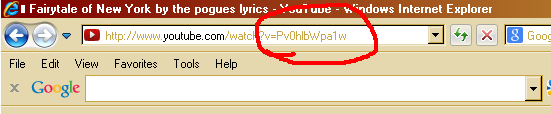
Okay, see the random string of numbers/letters/etc that's circled? (In this case, Pv0hlbWpa1w) Copy that and paste it into the YouTube player code, after "/v/". You don't need any other part of the URL, just the "Pv0hlbWpa1w" (or w/e) part.
So once you've got the url and changed the colours to your liking, you *should* have a player that looks something like this:
This is what it should look like on profiles. (I put the song title/artist underneath, it doesn't do that automatically or anything. You don't *have* to do it, though.)
Some notes... These work on profiles, forums, the OA, and I *think* they work in shop descriptions, I'm not sure. They probably work in profile/OA comments too.
This code is set to NOT autoplay. I don't know how to make it autoplaying and autoplay sucks anyway, so. :P
You can tweak the width/height if you want, although remember that you MUST have a way to stop the music. It's against the rules to set the player's height/width to 0x0 or something like that, the play button at least must be visible, if nothing else.
Please note that not all videos can be embedded like this. If the video uploader has disabled embedding for the video in question, you're out of luck. :< But you can always find another upload of the song, if that happens.
Yes, I have odd tastes in music.
Okay, so.. I think that covers everything, so here's the code. Just copy and paste the code from the little box below. Remember to change the url/colours, unless you actually want "Fairytale of New York" in a hot pink player on your profile or something. :P